Zero-Cost Enterprise Email Architecture: Cloudflare Routing + Amazon SES
How to architect a resilient, production-ready custom domain email infrastructure with zero mailbox fees, complete SPF/DKIM cryptographic authentication, and unified inbox management.
When launching a new domain, technical publication, or homelab infrastructure, administrators routinely default to Google Workspace ($6/user/mo) or Microsoft 365 ($6–$12.50/user/mo). While centralized productivity suites are indispensable for multi-user enterprise organizations, paying recurring monthly seat licenses solely to receive and send administrative messages (admin@, contact@, security@, billing@) introduces unnecessary SaaS bloat.
This runbook documents our asymmetric email architecture: decoupling Ingress (Inbound edge routing) from Egress (Outbound cryptographic relay).
By combining Cloudflare Email Routing with Amazon Simple Email Service (SES), you gain an enterprise-grade email setup that costs $0.00/month, achieves 100% SPF, DKIM, and DMARC alignment, and allows bidirectional sending and receiving from your everyday personal email client without leaking source identities.
1. System Topology: The Asymmetric Decoupling Pattern
Traditional email setups couple mail storage, incoming delivery (MX), mailbox hosting (IMAP), and outgoing transport (SMTP) into a single monolithic provider. Our architecture splits these responsibilities across dedicated edge infrastructure:
1.1 Inbound Edge Ingress Flow (Cloudflare Email Routing)
Incoming mail is intercepted at Cloudflare’s Anycast edge, evaluated in-memory against alias rules without persistent disk storage, and relayed over encrypted TLS directly to your verified personal inbox:
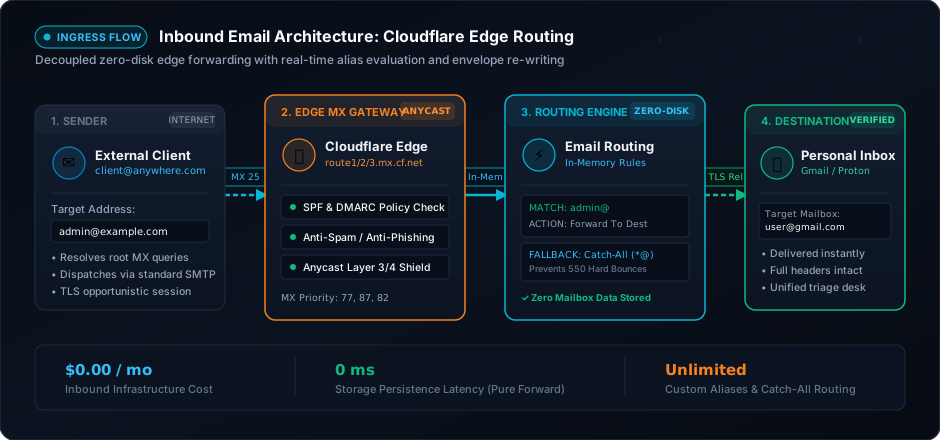
[ Incoming Sender ] ──(MX Port 25 / TLS)──▶ [ Cloudflare Edge MX (77/87/82) ] ──(In-Memory Rules)──▶ [ Personal Destination Inbox ]1.2 Outbound Cryptographic Egress Flow (Amazon SES Relay)
Outbound messages and replies dispatch from your everyday personal mail client using authenticated STARTTLS submission. Amazon SES signs the headers with a 2048-bit RSA DKIM key and aligns the envelope Return-Path for 100% DMARC compliance:
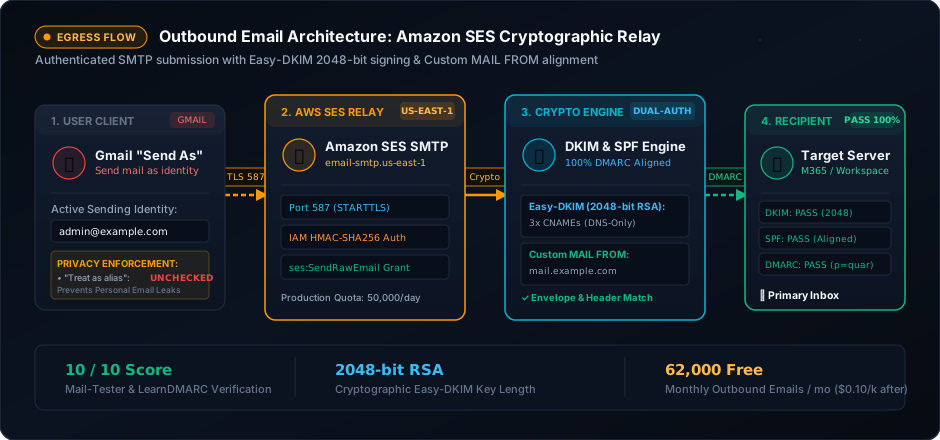
[ Personal Mail Client (Gmail) ] ──(Port 587 STARTTLS)──▶ [ Amazon SES Gateway ] ──(2048-bit DKIM + Aligned SPF)──▶ [ Recipient Inbox (Pass) ]Why Decoupling Outperforms Monolithic Hosts
- Zero Storage & Breach Risk at the Edge: Cloudflare never writes incoming messages to disk. Incoming SMTP transactions are evaluated in-memory against your configured routing rules and forwarded directly to your personal destination mailbox.
- Industrial Outbound Reputation: Shared web hosts (cPanel, Namecheap, Zoho free tiers) frequently route outbound emails through dirty IP ranges that land in spam folders. Amazon SES routes outbound mail through globally monitored, high-reputation IP blocks with strict bounce suppression.
- Cryptographic Parity with Enterprise Tenants: With Easy-DKIM 2048-bit key rotation and an aligned Custom
MAIL FROMenvelope, your domain passes every modern security check (BIMI, DMARCp=quarantine/p=reject, and Google/Yahoo bulk sender mandates). - Economic Footprint: Cloudflare Email Routing is 100% free with unlimited custom addresses. Amazon SES provides 62,000 free outbound emails per month when called from EC2, or charges $0.10 per 1,000 messages (less than pennies per year for typical administrative use).
2. Phase 1: Inbound Architecture (Cloudflare Email Routing)
2.1 Destination Email Address Verification
Before routing incoming traffic for your custom domain, Cloudflare requires cryptographic verification that you own the ultimate destination mailbox:
- Log in to the Cloudflare Dashboard and select your domain (
example.com). - In the left navigation, navigate to Email ➔ Email Routing ➔ Destination addresses.
- Click Add destination address and enter your personal inbox (e.g.,
[email protected]). - Check your personal inbox for the verification email from Cloudflare and click the confirmation link. The status will transition to Verified.
2.2 DNS Edge Routing Records
When Email Routing is activated, Cloudflare provisions three priority-tiered MX records and an authorized sender policy:
| Record Type | Host | Target / Value | Priority | Proxy Status | Purpose |
|---|---|---|---|---|---|
| MX | @ |
route1.mx.cloudflare.net |
77 |
DNS only | Primary edge inbound mail exchanger |
| MX | @ |
route2.mx.cloudflare.net |
87 |
DNS only | Secondary failover mail exchanger |
| MX | @ |
route3.mx.cloudflare.net |
82 |
DNS only | Tertiary failover mail exchanger |
| TXT | @ |
v=spf1 include:_spf.mx.cloudflare.net include:amazonses.com ~all |
— | DNS only | Authorized envelope sender policy |
Critical DNS Configuration Note: Cloudflare’s automated wizard proposes
v=spf1 include:_spf.mx.cloudflare.net ~all. Because we are also utilizing Amazon SES for outbound transmission, you must merge both authorization mechanisms into a single root SPF record as shown above. Having multiple SPF TXT records on a single root domain violates RFC 7208 Section 3.2 and causes immediatePermErrorvalidation failures.
2.3 Forwarding Rules Engine
Under Email ➔ Email Routing ➔ Routing rules, establish your operational rule table:
- Custom Address Rules: Explicitly configure critical administrative aliases:
[email protected]➔ Send to[email protected][email protected]➔ Send to[email protected][email protected]➔ Send to[email protected]
- Catch-All Fallback Address: Enable the Catch-all address rule and route unmatched queries to your primary inbox. This ensures typo variations (e.g.,
billing@or misaddressed correspondence) never trigger anSMTP 550 No Such Userbounce.
3. Phase 2: Outbound Architecture (Amazon SES)
Cloudflare handles ingress exclusively. For egress, Amazon SES functions as our cryptographically verified, high-deliverability SMTP relay.
3.1 Domain Identity & Easy-DKIM Setup
- In the AWS Management Console, switch to your target deployment region (e.g.,
us-east-1N. Virginia). - Open Amazon Simple Email Service (SES) ➔ Configuration ➔ Identities.
- Click Create identity, select Domain, and enter
example.com. - Under Verifying your domain, select Easy-DKIM:
- DKIM signing key length: Select
RSA_2048_BIT. - DKIM signatures: Enabled.
- DKIM signing key length: Select
- Click Create identity.
SES will generate three distinct 2048-bit CNAME records pointing to dkim.amazonses.com:
Record 1: [token1]._domainkey.example.com ──▶ [token1].dkim.amazonses.com
Record 2: [token2]._domainkey.example.com ──▶ [token2].dkim.amazonses.com
Record 3: [token3]._domainkey.example.com ──▶ [token3].dkim.amazonses.com
Cloudflare Proxy Gotcha: When creating these three CNAME records in Cloudflare DNS, you MUST set the Proxy status to DNS only (Gray cloud). Enabling Cloudflare’s HTTP proxy (Orange cloud) on DKIM records causes public DNS resolvers to receive Cloudflare Anycast IP addresses instead of the raw AWS CNAME target, permanently breaking cryptographic signature validation.
3.2 Custom MAIL FROM Domain (The Key to 100% DMARC Alignment)
By default, Amazon SES sets the RFC 5321 Envelope Return-Path to its shared infrastructure domain (e.g., [email protected]). While SPF will pass for amazonses.com, DMARC SPF alignment will fail because the envelope domain does not match your visible From header domain (example.com).
To achieve 100% SPF alignment under strict DMARC enforcement:
- In the SES Console, open your verified identity (
example.com). - Navigate to the Custom MAIL FROM domain tab and click Edit.
- Check Use a custom MAIL FROM domain.
- Enter a dedicated subdomain:
mail(resulting inmail.example.com). - Set Behavior on MX failure to
Use default MAIL FROM domain. - Add the two required DNS records to Cloudflare:
| Record Type | Host | Target / Value | Priority | Proxy Status |
|---|---|---|---|---|
| MX | mail |
feedback-smtp.us-east-1.amazonses.com |
10 |
DNS only |
| TXT | mail |
v=spf1 include:amazonses.com ~all |
— | DNS only |
Now, both the envelope sender and header sender share your organizational domain, ensuring SPF and DKIM align simultaneously with DMARC.
3.3 IAM SMTP Credentials Generation
To authenticate outbound SMTP submissions from a mail client, generate an RFC-compliant SMTP credential set:
- In the AWS SES Console, open Account dashboard in the left menu.
- Locate the Simple Mail Transfer Protocol (SMTP) settings section and click Create SMTP credentials.
- Enter an IAM username (e.g.,
ses-smtp-example-relay) and click Create user. - Download the generated credentials:
- SMTP Username: An Access Key ID (e.g.,
AKIAIOSFODNN7EXAMPLE) - SMTP Password: A 44-character base64 string derived by AWS via HMAC-SHA256 from the IAM secret key.
- SMTP Username: An Access Key ID (e.g.,
The IAM policy created under the hood restricts the user strictly to outbound transmission:
{
    "Version": "2012-10-17",
    "Statement": [
        {
            "Effect": "Allow",
            "Action": [
                "ses:SendEmail",
                "ses:SendRawEmail"
            ],
            "Resource": "*"
        }
    ]
}
3.4 Moving Out of the Amazon SES Sandbox
All new AWS SES accounts start in the SES Sandbox. In the sandbox:
- You can only send mail to pre-verified identities.
- Your volume is capped at 200 messages per 24-hour period and 1 message per second.
To lift these restrictions for production operation:
- In the SES Console, click Request production access on the account dashboard.
- Complete the request form:
- Mail type: Transactional.
- Website URL:
https://example.com. - Use case description: Outline your administrative workflow clearly:
“This domain runs administrative contact endpoints ([email protected], [email protected]). Inbound mail is routed via Cloudflare to administrative personnel. Outbound mail consists exclusively of human-initiated direct replies to incoming inquiries and critical security notices. We do not send marketing bulk email. Bounces and complaints are tracked via SES and handled immediately.”
- AWS typically approves production requests within 12–24 hours, granting a starting quota of 50,000 messages/day.
4. Phase 3: Mail Client Integration (Unified Gmail Interface)
Rather than logging into separate webmail consoles, configure your existing personal Gmail client to send and receive on behalf of your custom domain.
4.1 Adding the Custom Send-As Identity
- In Gmail, open Settings (gear icon) ➔ See all settings ➔ Accounts and Import.
- Locate the Send mail as section and click Add another email address.
- In the setup modal:
- Name:
SecOps Admin(or your preferred display name). - Email address:
[email protected]. - Uncheck “Treat as an alias” (Crucial: see explanation below).
- Name:
- Click Next Step.
The “Treat as an alias” Security Gotcha: When “Treat as an alias” is checked, Gmail treats the custom address as a secondary label on your personal inbox. In certain scenarios, Gmail will inject your personal address into the
Sender:orX-Google-Original-From:email headers, exposing your personal email address to the recipient. Unchecking this box instructs Gmail to treat the identity as a completely independent mailbox, preserving privacy.
4.2 Outbound SMTP Relay Parameters
Configure the SMTP parameters provided by Amazon SES:
- SMTP Server:
email-smtp.us-east-1.amazonaws.com(adjust if using another AWS region) - Port:
587 - Username: The generated IAM SMTP Username (
AKIA...) - Password: The generated IAM SMTP Password
- Connection Security: Secured connection using TLS (recommended)
Click Add Account.
[ Gmail Client ] ────(STARTTLS Port 587)────▶ [ AWS SES SMTP Server ] ──▶ [ Recipient ]4.3 The Verification Loop
- Gmail immediately dispatches a verification code to
[email protected]. - Cloudflare Email Routing catches the message and forwards it directly to your personal Gmail inbox.
- Open the incoming verification email, copy the confirmation code, paste it into the setup modal, and click Verify.
4.4 Automated Reply Identity Alignment
Under Settings ➔ Accounts and Import ➔ Send mail as, locate the section labeled When replying to a message:
Select: “Reply from the same address the message was sent to”
Whenever an email sent to [email protected] arrives in your inbox, clicking “Reply” will automatically select [email protected] as the sender, routes the response through Amazon SES, and signs it with your 2048-bit DKIM key.
5. Master DNS & Cryptographic Security Reference
Below is the authoritative DNS configuration table for example.com on Cloudflare:
| Record Type | Host | Target / Value | Priority | Proxy Status | Managed By | Purpose |
|---|---|---|---|---|---|---|
| MX | @ |
route1.mx.cloudflare.net |
77 |
DNS only | Cloudflare | Inbound mail exchanger (Primary) |
| MX | @ |
route2.mx.cloudflare.net |
87 |
DNS only | Cloudflare | Inbound mail exchanger (Secondary) |
| MX | @ |
route3.mx.cloudflare.net |
82 |
DNS only | Cloudflare | Inbound mail exchanger (Tertiary) |
| TXT | @ |
v=spf1 include:_spf.mx.cloudflare.net include:amazonses.com ~all |
— | DNS only | Admin | Combined SPF envelope policy |
| CNAME | [token1]._domainkey |
[token1].dkim.amazonses.com |
— | DNS only (Gray) | AWS SES | Easy-DKIM Key #1 (2048-bit) |
| CNAME | [token2]._domainkey |
[token2].dkim.amazonses.com |
— | DNS only (Gray) | AWS SES | Easy-DKIM Key #2 (2048-bit) |
| CNAME | [token3]._domainkey |
[token3].dkim.amazonses.com |
— | DNS only (Gray) | AWS SES | Easy-DKIM Key #3 (2048-bit) |
| MX | mail |
feedback-smtp.us-east-1.amazonses.com |
10 |
DNS only | AWS SES | Custom MAIL FROM bounce endpoint |
| TXT | mail |
v=spf1 include:amazonses.com ~all |
— | DNS only | AWS SES | Custom MAIL FROM SPF authorization |
| TXT | _dmarc |
v=DMARC1; p=quarantine; rua=mailto:[email protected]; pct=100; |
— | DNS only | Admin | DMARC policy & aggregate reporting |
Staging Your DMARC Policy
Never launch a domain immediately with p=reject. Roll out your DMARC posture through staged phases:
- Phase 1 (Monitoring - 7 to 14 days):
Inspect aggregate XML reports to confirm all valid sending sources (SES, scripts, monitoring bots) pass DKIM and SPF without false positives.v=DMARC1; p=none; rua=mailto:[email protected]; pct=100; - Phase 2 (Quarantine Enforcement):
Unauthorized spoofing attempts are routed directly to recipient spam folders.v=DMARC1; p=quarantine; rua=mailto:[email protected]; pct=100; - Phase 3 (Strict Rejection):
Receiving mail servers drop spoofed messages at the SMTP connection layer.v=DMARC1; p=reject; rua=mailto:[email protected]; pct=100;
6. Verification, Deliverability & Troubleshooting Runbook
6.1 CLI Verification Checklist
Audit your DNS propagation across public resolvers directly from your terminal:
Windows PowerShell (Resolve-DnsName)
# 1. Verify Inbound Cloudflare MX Records (Priorities: 77, 87, 82)
Resolve-DnsName -Name example.com -Type MX | Select-Object NameExchange, Preference

# 2. Verify Root SPF Authorization Policy
(Resolve-DnsName -Name example.com -Type TXT).Strings | Where-Object { $_ -match 'v=spf1' }

# 3. Verify Easy-DKIM 2048-bit CNAME Delegations (Repeat for tokens 1-3)
Resolve-DnsName -Name "[token1]._domainkey.example.com" -Type CNAME | Select-Object Name, NameHost

# 4. Verify Custom MAIL FROM Subdomain MX & SPF Alignment
Resolve-DnsName -Name mail.example.com -Type MX | Select-Object NameExchange, Preference
(Resolve-DnsName -Name mail.example.com -Type TXT).Strings

# 5. Verify DMARC Policy Enforcement
(Resolve-DnsName -Name _dmarc.example.com -Type TXT).Strings
Windows Command Prompt (nslookup)
:: 1. Verify Inbound MX Records
nslookup -type=mx example.com

:: 2. Verify Root SPF Authorization
nslookup -type=txt example.com

:: 3. Verify Easy-DKIM CNAME Delegation
nslookup -type=cname [token1]._domainkey.example.com

:: 4. Verify Custom MAIL FROM MX & SPF
nslookup -type=mx mail.example.com
nslookup -type=txt mail.example.com

:: 5. Verify DMARC Enforcement
nslookup -type=txt _dmarc.example.com
Linux & macOS (dig)
# 1. Verify Inbound MX Records
dig +short MX example.com

# 2. Verify Root SPF Authorization
dig +short TXT example.com | grep "v=spf1"

# 3. Verify Easy-DKIM CNAME Pointers
dig +short CNAME [token1]._domainkey.example.com

# 4. Verify Custom MAIL FROM Envelope MX & SPF
dig +short MX mail.example.com
dig +short TXT mail.example.com

# 5. Verify DMARC Enforcement
dig +short TXT _dmarc.example.com
6.2 End-to-End Deliverability Testing
Before conducting production business:
- Send a test message from your Gmail client (
[email protected]) to an automated testing suite such as Mail-Tester or LearnDMARC. - Open the raw MIME headers of the received email and confirm the cryptographic authentication chain:
Authentication-Results: mx.google.com; dkim=pass [email protected] header.s=[token1] header.b=...; spf=pass (google.com: domain of [email protected] designates ... as permitted sender) smtp.mailfrom=...; dmarc=pass (p=QUARANTINE sp=QUARANTINE dis=NONE) header.from=example.com - A properly configured setup achieves a 10/10 score on Mail-Tester with zero warnings.
6.3 Common Pitfalls & Resolution Matrix
| Symptom | Root Cause | Remediation |
|---|---|---|
| DKIM Verification Pending indefinitely | Cloudflare CNAME record has Proxy enabled (Orange cloud). | Toggle the proxy status to DNS only (Gray cloud) in Cloudflare DNS. |
SPF PermError: Too many DNS lookups |
Root domain exceeds RFC 7208 limit of 10 nested DNS mechanisms. | Flatten SPF records or remove unnecessary SaaS include: directives. |
SES 554 Message rejected: Email address is not verified |
AWS SES account is still restricted in the Sandbox. | Submit the Production Access request in the SES console to lift destination limits. |
Gmail SMTP Error 535 Authentication Credentials Invalid |
Provided standard AWS IAM Secret Key instead of derived SMTP password. | Generate credentials via the dedicated Create SMTP Credentials button in the SES console. |
DMARC shows DKIM Pass but SPF Alignment Fail |
Custom MAIL FROM subdomain (mail.example.com) was not configured. |
Set up the Custom MAIL FROM subdomain and add its corresponding MX and TXT records. |
| Personal email leaks in outgoing email headers | “Treat as an alias” is checked in Gmail settings. | Edit the sending identity in Gmail and uncheck “Treat as an alias”. |
7. Operational Summary & Maintenance
By separating inbound edge routing from outbound cryptographic transport, you eliminate fixed mailbox overhead while maintaining an enterprise-grade deliverability posture.
- Ongoing Cost: $0.00/month
- Inbound Redundancy: 3x Cloudflare Anycast edge MX nodes with zero disk retention
- Outbound Deliverability: 100% DKIM + SPF alignment via Amazon SES global relays
- Unified Management: Native Gmail client workflows without switching accounts or running local mail daemons
Get The Next Production Runbook in Your Inbox
Join 500+ MSP & SecOps engineers. Receive battle-tested configurations, 5-minute audio briefings, and critical security advisories every Tuesday.